SENSEX Option Chain 2026 - Live & Historical OI & Greeks
View live and historical SENSEX option chain with real-time prices, open interest, volume, and Greeks. Switch to Historical Mode to replay past data for any trading date. Track all strikes and expiries in one place.
BSE Sensex (SENSEX) Option Chain: PCR (Put-Call Ratio) at Each Strike
What is PCR in the SENSEX option chain?
PCR stands for Put-Call Ratio. In the SENSEX option chain, it is shown in the centre column next to each strike price. The strike-level PCR is calculated by dividing put OI by call OI at that specific strike. A PCR of 2.0 means there is twice as much put OI as call OI at that strike — heavy put writing, indicating strong support. A PCR of 0.3 means call OI is more than 3x put OI — heavy call writing, indicating strong resistance. The overall PCR for BSE Sensex (total put OI / total call OI across all strikes) is shown in the summary.
How to interpret SENSEX PCR for trading
For BSE Sensex, a total PCR above 1.0 is generally considered bullish — it means more puts are written than calls, and put sellers (usually sophisticated participants) are confident that SENSEX will hold above current support levels. A PCR below 0.7 signals bearish sentiment — call sellers dominate, capping the upside. For BSE Sensex, the PCR typically ranges between 0.7 and 1.5. Extreme readings above 1.3 or below 0.5 often precede reversals.
What is Volume PCR and how it differs from OI PCR
The SENSEX option chain shows both PCR (based on OI) and Volume PCR (based on today's trading volume). OI PCR reflects cumulative positioning — slower moving, better for swing trades. Volume PCR reflects today's sentiment only — faster moving, better for intraday decisions. When both agree (both above 1.0 or both below 0.7), the signal is strong. When they diverge — say OI PCR is 1.2 but Volume PCR is 0.6 — it means today's activity contradicts the overall positioning. This divergence in BSE Sensex often signals a potential shift in sentiment that hasn't fully shown up in OI yet.
Using strike-level PCR to map SENSEX's expected range
Scan the PCR column across strikes in the SENSEX option chain. Strikes where PCR transitions from above 1.0 (below the current price — put dominated, support) to below 1.0 (above the current price — call dominated, resistance) mark the equilibrium zone. This zone often predicts where BSE Sensex will settle near expiry. Strikes with PCR above 3.0 are very strong support floors. Strikes with PCR below 0.2 are formidable ceilings. Map these extreme-PCR strikes to quickly define the SENSEX trading range without any additional tools.
BSE Sensex (SENSEX) Option Chain: Column Settings and Pro Tips
Full number vs short number display in the SENSEX chain
The SENSEX option chain supports two number formats. Short format shows values like "5L" for 5 lakh or "2K" for 2 thousand — compact and fast to scan when you have many strikes visible. Full format shows the exact value like "5,00,000" — more precise but takes more screen space. For active intraday traders monitoring several strikes simultaneously, short format is preferable. For detailed analysis where exact counts matter, full format gives cleaner reads. Toggle between them based on what you are doing.
Recommended column layouts for different trading styles
For intraday scalping on SENSEX: enable OI, OI Change, LTP, Buildup, and Volume. These five columns give you fast-moving sentiment signals. For swing trading: add IV, IV Change, and Greeks (Delta, Theta). These help with entry timing and strike selection for multi-day holds. For analysis only: enable all columns including PCR, Volume PCR, Vol/OI, Intrinsic Value, Time Value, and Open HL. This gives the complete picture of BSE Sensex's option landscape. The column settings are saved per session, so you can customise the SENSEX chain for your trading style.
Sorting and pinning summary rows
The SENSEX option chain allows sorting by any column — click a column header to sort. Sorting by OI quickly shows you the most loaded strikes. Sorting by OI Change shows the most active strikes today. Sorting by Volume reveals where the highest trading activity is concentrated. The summary rows (ITM Total, OTM Total, Total) can be pinned to the top of the SENSEX chain, giving you running totals that are always visible as you scroll through strikes. Pinned totals are especially useful for tracking BSE Sensex's aggregate OI changes in real-time.
Pro tips for getting the most from the SENSEX option chain
Tip 1: Watch the Rank badges — they instantly highlight the most important strikes without scanning every row. Tip 2: Use the chart button at each strike's LTP to study intraday premium behaviour. Tip 3: Compare PCR and Volume PCR — divergence between them signals a potential sentiment shift. Tip 4: On expiry day, enable Gamma and monitor it at ATM strikes — high Gamma warns of explosive premium moves. Tip 5: Use Historical Mode to study BSE Sensex's option chain from 3-5 days before major past events. You will start recognising OI patterns that repeat. For BSE Sensex, this tool is your single most comprehensive options analysis platform. Effective as of 6 October 2026.
BSE Sensex (SENSEX) Option Chain: Understanding Expiry Week Patterns
How does the SENSEX option chain change during expiry week?
Expiry week transforms the SENSEX option chain. Monday-Tuesday: the week's framework is set. Fresh OI builds at strikes where traders expect expiry settlement. Support and resistance levels crystallise. Wednesday: repositioning begins. Losing positions are closed (OI drops at some strikes), and OI migrates to new strikes as expectations adjust. Thursday/Friday (expiry): OI unwinding accelerates as options approach worthlessness. ATM Gamma spikes. The SENSEX chain shows all of this in real-time through OI Change, Buildup, and volume data. BSE Sensex expiry weeks see the highest volume of the month, making option chain data most reliable.
What happens to Theta during SENSEX expiry week?
Theta decay accelerates dramatically. The Theta column in the SENSEX option chain shows increasingly negative values as expiry approaches. An option losing Rs. 3/day two weeks out might lose Rs. 10/day in the final week and Rs. 30/day on expiry day itself. For BSE Sensex option sellers, this is the most profitable period — premium evaporates rapidly if the underlying stays range-bound. For buyers, holding SENSEX options into expiry week is expensive unless you expect a very large move. The SENSEX chain's Theta column quantifies exactly how much you will lose each day by holding.
The Gamma spike on SENSEX expiry day
On expiry day, Gamma at ATM SENSEX strikes reaches extreme levels. The SENSEX option chain will show Gamma values 3-5x higher than normal. This means tiny underlying moves cause massive premium swings. A SENSEX option worth Rs. 5 can become Rs. 40 with a 50-point move, or drop to Rs. 1. This Gamma effect creates both the biggest opportunities and biggest risks. For buyers: high Gamma gives leveraged exposure at low premium. For sellers: it is the most dangerous day to have naked short positions. Always check the Gamma column before trading BSE Sensex options on expiry day.
Max Pain convergence in the SENSEX expiry week
The max pain marker in the SENSEX option chain becomes most relevant during expiry week. As Theta destroys OTM option values and market maker hedging concentrates around fewer strikes, SENSEX tends to gravitate toward the max pain level. This convergence is typically visible from Wednesday onwards. If BSE Sensex is within 0.5% of max pain by Thursday, expect it to pin there on Friday — sell strangles or iron butterflies centred at max pain. If it is more than 1.5% away, the gravitational pull may not be strong enough. Index max pain convergence is the most reliable due to massive OI backing the levels.
Option Chain: Video Walkthrough
SENSEX option chain OI: quick reference
| OI signal in the chain | Where to look | What it means for SENSEX |
|---|---|---|
| Highest Call OI | Strike above spot with peak call OI | Key resistance; expected ceiling before expiry |
| Highest Put OI | Strike below spot with peak put OI | Key support; expected floor before expiry |
| Rising Call OI (+ Chg OI) | Call side of a strike | Fresh call writing; resistance building at that level |
| Rising Put OI (+ Chg OI) | Put side of a strike | Fresh put writing; support building at that level |
| Falling Call OI (− Chg OI) | Call side unwinding | Short covering; resistance weakening, upside room |
| Falling Put OI (− Chg OI) | Put side unwinding | Support being pulled; downside risk rising |
Read these from the live chain's OI and change-in-OI (Chg OI) columns. The widest Call and Put OI clusters bracket the expected SENSEX range for the expiry, while the Chg OI column tells you whether a level is being reinforced or unwound. OI concentration can shift through the session, so re-check the chain as expiry approaches.
How StockMojo calculates SENSEX option chain data
StockMojo sources the SENSEX option chain from the live NSE data feed. During market hours (09:15–15:40 IST) the chain refreshes continuously as new ticks arrive; outside market hours it shows the last session's closing snapshot. Historical mode replays the full chain for any past trading date.
Derived columns are recomputed on every refresh rather than cached: change in OI is measured against the previous session's close, the Buildup classification combines the direction of price change with the direction of OI change, and the Put-Call Ratio is total put OI divided by total call OI across active strikes.
Implied volatility and the Greeks (Delta, Gamma, Theta, Vega) are recalculated from the Black-Scholes model on each refresh, using the live underlying price, each contract's strike and time to expiry, and the prevailing risk-free rate — so displayed values reflect current market conditions rather than delayed snapshots.
How to use the StockMojo Option Chain
- Pick a symbol — Type or select Nifty, BankNifty, FinNifty, or any F&O stock in the symbol search at the top.
- Choose your expiry — Use the expiry dropdown to switch between weekly and monthly contracts. The current week is selected by default.
- Identify the ATM strike — Find the highlighted at-the-money strike — this is your reference point for reading OI and IV across the chain.
- Scan OI and Change in OI — Look for strikes with the highest call OI (resistance) and put OI (support). Check Change in OI to see where new positions are being built right now.
- Cross-reference with Max Pain and PCR tools — Open Max Pain and Put Call Ratio in adjacent tabs to confirm whether the OI picture aligns with broader sentiment.
SENSEX Option Chain — Frequently Asked Questions
How to read SENSEX option chain?
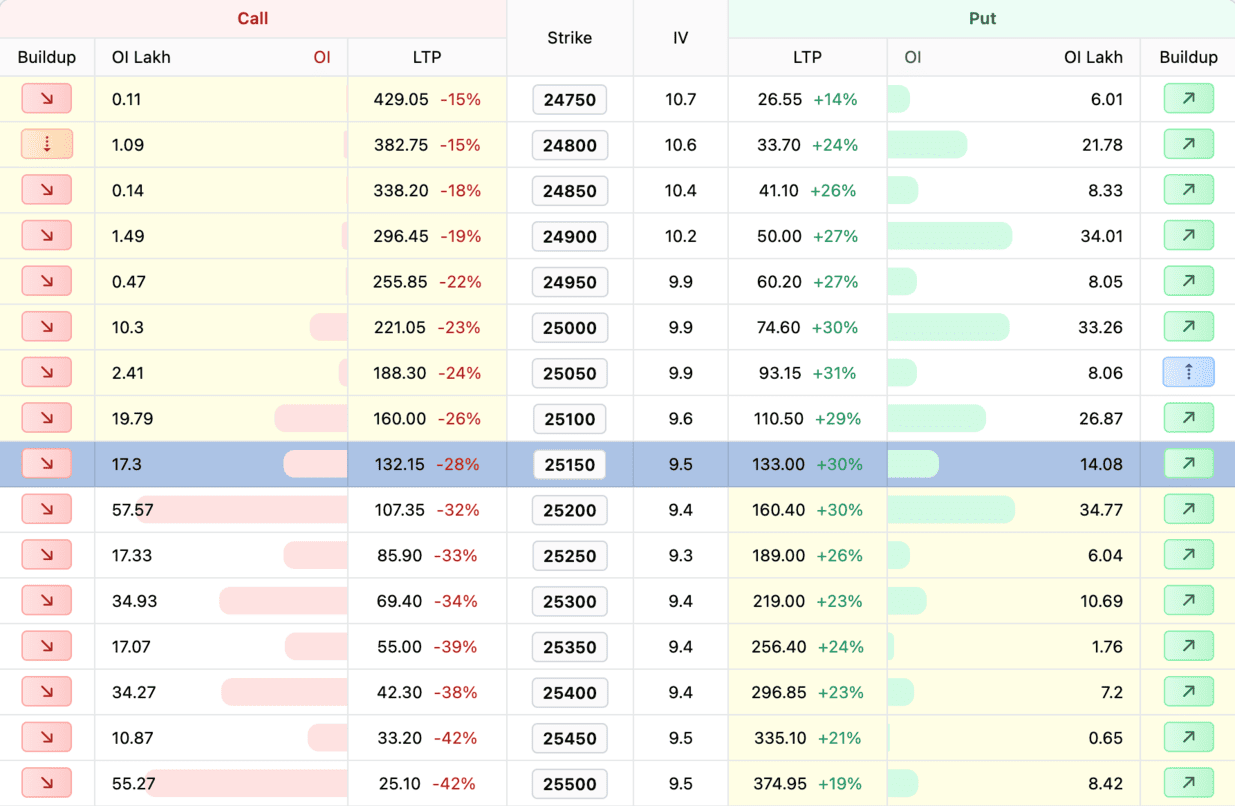
The SENSEX option chain shows all available options with their strike prices, premiums, open interest and volume. Calls are on the left, puts on the right. High OI at a strike indicates strong support/resistance. Use the chain to analyze market sentiment and plan your trades.
What is SENSEX open interest in option chain?
Open Interest (OI) in SENSEX option chain shows total outstanding contracts at each strike. Rising OI with rising price = bullish (long buildup). Rising OI with falling price = bearish (short buildup). Concentration of Put OI suggests support, Call OI suggests resistance.
Which strike to buy in SENSEX options?
For SENSEX options, ATM strikes have highest theta decay but most responsive to price moves. ITM options cost more but have less time decay risk. OTM options are cheaper but need larger moves. Consider your trade duration, risk tolerance and view strength when selecting strikes.
Can I view historical option chain data for SENSEX?
Yes, switch to Historical Mode to view past SENSEX option chain data for any trading date. You can replay OI, volume, and premium snapshots as they appeared on a specific date and expiry. This is useful for back-testing strategies and studying how OI build-up evolved before key SENSEX moves.
What does IV mean in the SENSEX option chain?
IV (implied volatility) in the SENSEX option chain is the market's expected volatility priced into each strike's premium. Higher IV means costlier options and a wider expected move. Compare call and put IV across strikes to spot skew — richer OTM put IV signals downside-hedging demand. IV typically spikes before SENSEX events and cools off afterwards.