NIFTY Multi-Strike Open Interest | Live OI Across Strikes
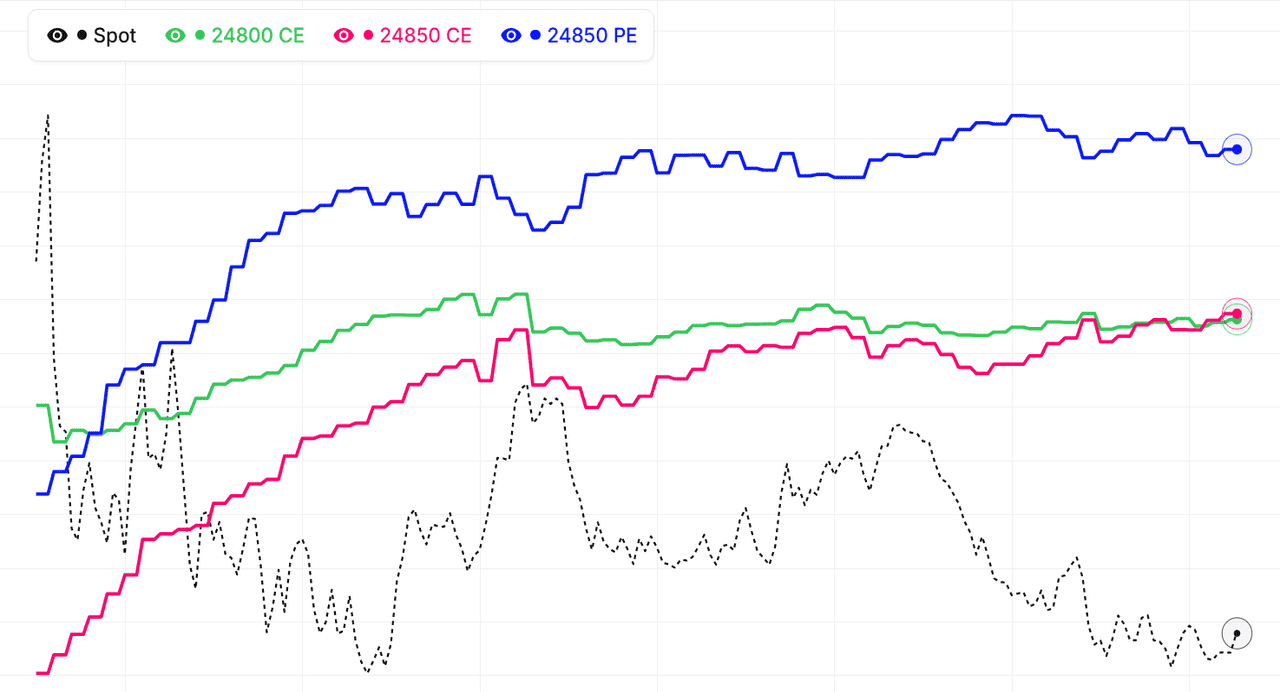
The multi-strike OI view for NIFTY shows open interest for several strikes on a single chart — the total OI footprint across the option chain instead of one strike at a time. This makes it easy to see how institutional positioning is distributed acrossNIFTY strikes: concentrated buildups reveal where writers are defending key levels, while OI unwinding across adjacent strikes signals that a directional move may be brewing as institutions exit structured positions.
Every strike's OI curve for NIFTY can be added, removed, or hidden, so you can focus on just the ATM band, the full ±5% range around spot, or specific far-OTM strikes you're watching for tail-risk hedging activity. You can track both total OI and OI change (the more important series for intraday reads), across all active expiries. Weekly expiries usually show faster, more reactive flows; monthly expiries show deeper institutional commitment in NIFTY option chains.
Reading the NIFTY multi-strike OI footprint
A heavy OI cluster at a NIFTY strike that's also showing rising total OI is a strong support or resistance reading — institutions are willing to sell more premium there, confident the strike will hold. When the cluster starts shedding OI (positive spot move into the strike but OI dropping), that's the classic unwinding signature that often precedes a breakout on NIFTY. The multi-strike view makes it obvious when this is happening at one strike or spreading across several. Live mode keeps each strike's OI updated across the NSE session.
Combine multi-strike OI with our Multi-Strike Volume, Total OI Chart, Smart OI Detection, and Live Option Chain to build a full picture of NIFTY NSE option-market positioning.
Nifty 50 (NIFTY) Multi-Strike OI: Custom Strike Selection
Why choose strikes manually instead of auto-selection?
Default strike selection on multi-strike tools usually picks strikes around ATM. That works well as a starting point, but manual selection lets you focus on the exact strikes that matter for your trade. If your Nifty 50 trade thesis focuses on specific support and resistance levels, pick those strikes. If you are watching a specific breakout zone, pick strikes around it. Custom selection turns the tool into a focused dashboard for your particular view.
How many NIFTY strikes should you track?
For most traders, 5-8 strikes is the sweet spot. Fewer than 5 misses important context. More than 10 becomes cluttered and hard to read. Pick 2-3 strikes above your current NIFTY price (resistance watch), 2-3 strikes below (support watch), and possibly the ATM strike itself. This balanced selection gives you a complete view of the nearby options landscape without overwhelming the chart.
Adjusting strike selection as NIFTY moves
Your selected strikes become less relevant as Nifty 50 price moves away from them. If you picked strikes centred on 22500 and NIFTY is now trading near 22800, your selection is stale. Update your strike list to centre on 22800. Good traders rebalance their multi-strike selection at least once a day — more often during trending sessions. This discipline keeps the tool aligned with current price action.
Saving NIFTY strike selections for different setups
Different trade setups benefit from different strike selections. A breakout watch might pick strikes above the current range. A support test might pick strikes below. A pinning setup for expiry day might pick the strikes closest to the expected max pain. Rather than re-selecting every time, think about your common setups and pre-define the strike groups you use. As of 5 October 2026, this preparation speeds up your live analysis and prevents rushed decisions in fast markets.
Nifty 50 (NIFTY) Multi-Strike OI: Identifying Unusual Activity
What counts as unusual OI activity on NIFTY?
Unusual activity is when OI at a specific strike suddenly grows much faster than the market's overall pace. For Nifty 50, a normal OI change might be a few thousand contracts. Unusual activity could be 50,000+ contracts in a single session at a strike that was previously quiet. The multi-strike view makes spotting unusual activity easy — any strike whose line is climbing faster than others stands out immediately.
What does unusual activity on NIFTY signal?
Unusual activity is often a fingerprint of informed traders — institutions or insiders making a confident bet. When you spot a strike with unusually aggressive OI growth, something is likely happening behind the scenes. Maybe an event is expected. Maybe a large trader knows something you do not. Maybe a hedge is being built. The signal is not always interpretable, but it is worth paying attention to.
Filtering false alarms on NIFTY unusual activity
Not every OI spike is a real signal. Some are: block trades that happen at month-end (portfolio rebalancing, not direction), errors in data feeds (unusual but meaningless), or retail pile-ons on popular news events (retail is often wrong). Filter for institutional-style activity: sustained rather than one-shot, near-ATM rather than far-OTM, and accompanied by reasonable volume. As of 5 October 2026, these filters screen out most false signals.
Responding to NIFTY unusual activity
When you spot genuine unusual activity, do not blindly follow. Investigate: what event might be coming? What is the directional implication of the activity (calls or puts, ITM or OTM)? Cross-reference with news and other tools. If the picture is clear, consider a small directional position aligned with the activity. If it is unclear, simply note the pattern and watch for follow-through in the next 1-2 sessions. Information from multi-strike OI is worth more when processed thoughtfully.
Nifty 50 (NIFTY) Multi-Strike OI: Common Mistakes
Mistake 1: Tracking too many NIFTY strikes
More is not better. Tracking 15+ strikes in the multi-strike view creates chart clutter that obscures the signal. You end up staring at a mess and making poor decisions. Stick to 5-8 strikes maximum. Quality of observation matters more than quantity of data. The best multi-strike views are focused, not exhaustive.
Mistake 2: Ignoring the NIFTY context
Multi-strike OI signals must be interpreted in context. A pattern that is bullish during normal trading may be meaningless during an event week. A signal that is reliable in high-liquidity periods may be noise in low-liquidity ones. Always ask: is the broader context (macro environment, event calendar, volatility regime) conducive to this signal? If not, reduce confidence accordingly.
Mistake 3: Trading every NIFTY signal
Patience beats activity. Not every OI shift warrants a trade. The highest-quality signals appear a few times per week, not every hour. If you try to trade every twitch in the multi-strike view, you will generate many losing trades from marginal setups. Wait for clear, high-conviction patterns and pass on the rest.
Mistake 4: Ignoring price action contradictions on NIFTY
Sometimes the multi-strike view shows bullish OI while Nifty 50 price action is clearly bearish. Some traders ignore this contradiction and trade the OI signal anyway. This is a mistake. When price and OI disagree, wait for resolution rather than assuming one side is right. As of 5 October 2026, respecting contradictions prevents forced trades in unclear situations.
NIFTY multi-strike OI patterns: quick reference
| OI pattern across strikes | Positioning | Common reading |
|---|---|---|
| Call OI rising at adjacent strikes above spot | Resistance wall building | Upside capped near the cluster until writers cover |
| Put OI rising at adjacent strikes below spot | Support wall building | Downside defended near the cluster on NIFTY |
| Call OI falling at one strike, rising at the next higher | Call writers rolling up | Bullish — the effective resistance is shifting higher |
| Put OI falling at one strike, rising at the next lower | Put writers rolling down | Bearish — the effective support is shifting lower |
| Call and put OI both peaking at the same strike | Two-sided writing | Expiry pinning candidate; price gravitates to that strike |
| OI unwinding across several adjacent strikes | Writers exiting the zone | Defended zone weakening; breakout risk rising |
These patterns describe how OI typically migrates across NSE strikes, not fixed rules — always confirm with price action before trading them. The live NIFTY chart above plots total OI and change in OI for every selected strike, so you can watch walls build, writers roll, and unwinding start in real time.
How to use Multistrike OI
- Pick an underlying and expiry — Choose Nifty, BankNifty, or an F&O stock and select the expiry you want to analyze.
- Set the strike range — By default the view shows ATM ± 5 strikes. Widen the range if you want to see resistance/support strikes that are far from current price.
- Identify peaks in call and put OI — Look for the strike(s) where call OI and put OI both peak — these are the candidate pinning levels for the expiry.
- Watch OI shifts in real time — As the session progresses, monitor which strikes are gaining or losing OI. Migration up the ladder = bullish; down the ladder = bearish.
- Combine with Max Pain — Cross-reference the multistrike OI peak strike with the live max pain strike. When they agree, the pinning thesis is strongest.
NIFTY MultiStrike OI — Frequently Asked Questions
What is NIFTY MultiStrike OI?
NIFTY MultiStrike OI plots open interest for several option strikes as overlaid time series on one chart, instead of one strike at a time. It shows where positions are concentrated across the NIFTY option chain, so you can spot support and resistance walls, expiry pinning candidates, and OI migrating between strikes as the session develops.
How to interpret NIFTY multi-strike OI data?
Watch which NIFTY strikes are gaining or losing OI relative to their neighbours. Rising call OI at strikes above spot builds resistance; rising put OI below spot builds support. OI migrating up the strike ladder is bullish, migration down the ladder is bearish, and OI unwinding across adjacent strikes warns that a defended zone is giving way.
Which NIFTY strikes should I select on the multi-strike OI chart?
Start with the highest call OI strike (resistance), the highest put OI strike (support), and the ATM strike plus two on either side — that band is where NIFTY intraday positioning concentrates. StockMojo can auto-select the highest-OI or highest-volume strikes for each expiry, or you can track a custom list of up to 10 strikes.
How does NIFTY multi-strike OI confirm a breakout or expiry pinning?
A breakout is usually preceded by OI rotating beyond the old wall — call writers rolling to higher NIFTY strikes confirm upside, put writers rolling lower confirm downside. Pinning shows the opposite signature: call and put OI both peaking at one strike, which price tends to gravitate toward on expiry day as writers on both sides defend it.
How often does the NIFTY MultiStrike OI chart update?
During NSE market hours (9:15 AM to 3:40 PM IST) the NIFTY MultiStrike OI chart refreshes every minute from live option chain data, plotting both total OI and change in OI for every selected strike. Outside market hours it shows the last traded session, and historical mode lets you replay any past NIFTY expiry.